
Onsite help · Introductory prices

Bambu Lab setup & training in Salford & Manchester.

Get your printer ready, learn how to use it, or start creating your own 3D designs. Practical, patient help at your home, community space or workplace, using your own equipment.

Printer setup £149Two-hour training £119

Local travel included · No VAT added · Regional visits by quote

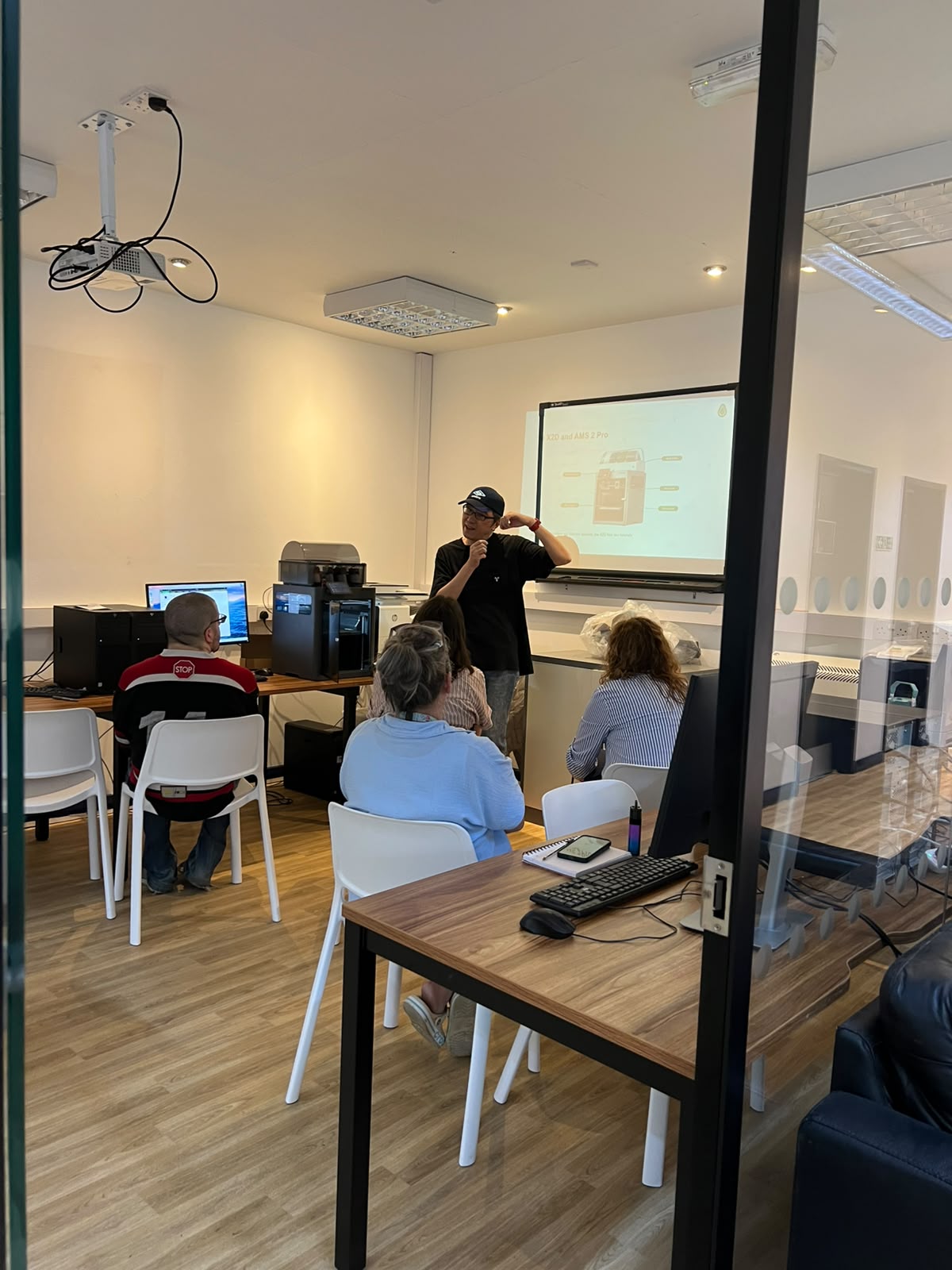
A small group learning Bambu Lab printer operation at a community centre
A practical staff session from our community-centre work.

Choose the help you need

A ready printer. A new skill.
Your own first design.

Book a standalone session or combine them into a longer visit. Training prices cover the whole group, with up to four adult learners.

01 / Get set up

Printer Setup & Testing

3 hours · One printer · At your premises

£149 Launch price

Planned regular local price £199

For a new Bambu Lab printer that needs unpacking, connecting and testing.

  • Hardware setup following the manufacturer’s instructions
  • One compatible AMS, if supplied and agreed
  • Bambu Studio installation and printer connection
  • Calibration, filament loading and a short validation print
  • Setup checklist and basic handover

Tell us your model and accessories. Choose Jumpstart if you also want the full operator course.

Enquire about setup
02 / Learn to print

Bambu Studio & Printer Operations

2 hours · Up to four adult learners

£119 Launch price

Planned regular local price £149

For a printer that is already set up and working. Learn the complete file-to-print workflow.

  • Import a model and select printer and filament settings
  • Understand orientation, supports, layer height and infill
  • Slice and check printing time and material use
  • Prepare the printer, start a short print and monitor it
  • Remove a print safely and learn routine care

Requires a working printer. Printer installation and 3D design tuition are separate sessions.

Enquire about training

03 / Make it your own

Tinkercad: Your First 3D Design

2 hours · Up to four adult learners

£119 Launch price

Planned regular local price £149

Create a simple 3D design, even if you have never used CAD software.

  • Find your way around Tinkercad
  • Build with basic shapes and accurate dimensions
  • Align, group and combine objects
  • Create holes and refine a small project
  • Export a file ready for the printing workflow

Leave with an editable model and exported file. No printer required; a physical print is not included.

Enquire about Tinkercad

Prices are per booking for the stated scope, with local travel included and no VAT added. Launch prices are introductory rates; the regular prices shown are planned rates following the service launch. Your accepted quote fixes the price for your booking. Regional travel and any additional work are agreed before booking.

Combine the sessions

From a new machine
to knowing what to do next.

Give setup, printing and design the time they need, with one clear package price.

Setup + design + operator training

Design-to-Print Programme

7 delivery hours · Two visits · Up to four adult learners

£349 Launch price

Planned regular local price £449

Learn how a simple design moves from the screen into the printing workflow.

  • Visit one: three hours of setup and testing
  • Visit two: two hours of Tinkercad, then two hours of operator training
  • Where suitable, a small learner-created design for the print exercise

Allow additional time for breaks. Regional travel is quoted for each visit.

Enquire about the programme

Larger groups, additional printers and extra visits are individually quoted. These are beginner sessions on your equipment; repairs and substantial troubleshooting need separate arrangements.

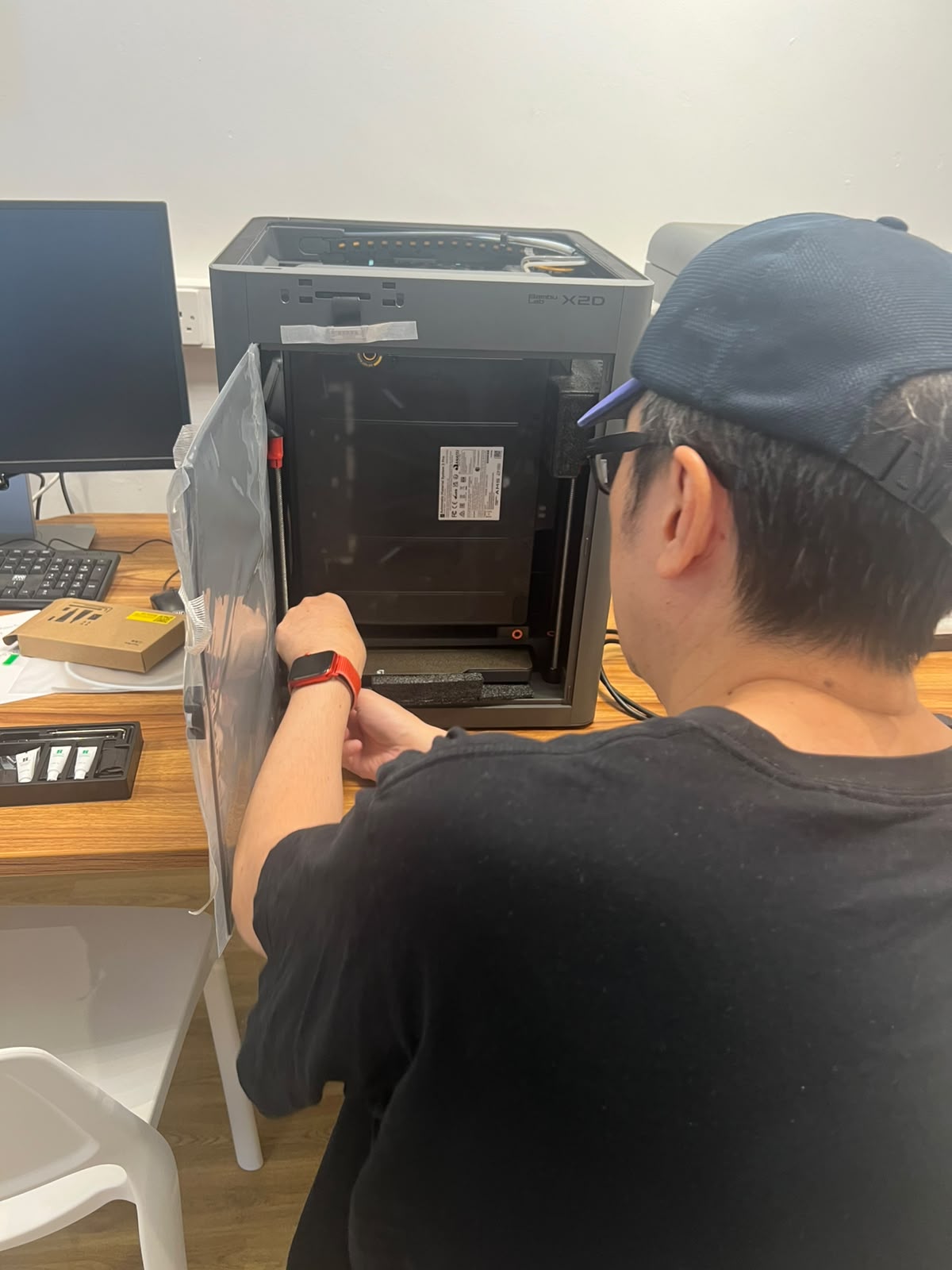
Unpacking and setting up a Bambu Lab X2D printer at a community centre
Hardware setup during our community-centre installation.

Experience from a real local project

Practical help at a community centre.

Our work with a local community centre included a Bambu Lab X2D installation, staff training and an introduction to 3D design.

That experience shapes these sessions: allocate proper time for setup, give people a practical workflow to follow, and teach design as a separate skill.

  1. 01
    Hardware and software setup

    Unpacking, connecting, configuring and testing the X2D.

  2. 02
    Staff training in the printing workflow

    Bambu Studio slicing and the steps from a model to a print.

  3. 03
    A first step into design

    A separate beginner Tinkercad course for creating simple 3D models.

We come to you

Local visits.
Wider areas by quote.

Send your postcode and preferred dates. We will confirm coverage and one total price before you book.

Local service areas

Local travel included in the package price

Salford, Ordsall, Pendleton, Salford Quays, MediaCity, central Manchester, Eccles, Monton, Trafford Park, Old Trafford and Stretford.

We also consider selected postcodes in Swinton, Pendlebury, Worsley, Prestwich, Chorlton, Urmston and Sale.

Regional service areas

Additional travel from £30 per visit

  • Greater Manchester: Stockport, Altrincham, Bolton, Bury, Oldham, Rochdale and Wigan.
  • Cheshire and Merseyside: Warrington, Knutsford, Wilmslow, Macclesfield and selected Liverpool postcodes.
  • Lancashire and West Yorkshire: Chorley, Preston, Blackburn and Huddersfield.

Coverage and the applicable rate depend on your exact postcode and appointment availability. A listed town does not mean every address is covered. Regional travel is quoted for each visit, including both visits in the Design-to-Print Programme.

A straightforward next step

Tell us what you have.
We’ll plan the visit.

01

Share the details

Email your postcode, printer model, accessories, learner count and the help you need.

02

Agree your session

We check the equipment, location and readiness, then confirm the scope and total price.

03

Practise on your equipment

Work through the session and keep a short reference sheet or checklist for afterwards.

For printer setup and operations

  • The agreed printer, accessories and suitable filament
  • A stable workspace, power and a compatible computer
  • Software-install permissions and network access arranged beforehand
  • A working printer for the standalone operations session

For Tinkercad

  • Suitable computers, internet access and accounts ready to use
  • A computer per learner, or an agreed paired exercise
  • No previous CAD experience needed
  • We send a preparation checklist for your booking

Each booking includes one remote follow-up of up to 20 minutes within seven days of your final session.

Before you book

A few useful answers.

Can you help if I bought my printer elsewhere?

Yes. You can book setup or training for a printer purchased directly from Bambu Lab or another retailer. Send the model and accessories so we can confirm suitability.

Do I need any 3D printing experience?

No. These are beginner sessions. We will ask what you have tried already and what you would like to make.

Does the two-hour operations course include printer setup?

It requires a working printer. Choose the three-hour setup session or Printer Jumpstart if your printer still needs installing and testing.

Is the training price per person?

The training price covers up to four adult learners at one location. Contact us about larger groups or different requirements.

Can you train staff at our community centre or workplace?

Yes. We can teach a small group on your own equipment. Please arrange computer permissions and network access beforehand so the session can focus on learning and printing.

Why are regional visits priced differently?

Regional visits include an additional charge for travel, starting at £30 per visit. Send your postcode and preferred dates, and we will confirm one total price before you book. A two-visit programme includes a travel charge for each visit.

Will you bring a printer, and is filament included?

Sessions use your printer at your premises. Tinkercad tuition can take place without a printer. We agree the small amount of suitable filament needed for the printing exercises when quoting; a stock of filament is not included in the package price.

What happens if the printer is faulty or cannot connect?

We explain the issue and agree the next step with you. Hardware repairs and substantial network troubleshooting need separate arrangements. We agree any additional work or time before proceeding.

Are you an official Bambu Lab service provider?

PeachAvo3D provides independent setup and training. Manufacturer warranty enquiries and repairs should be raised with the retailer or Bambu Lab.

Let’s get you started

Tell us about your printer.

Email your postcode, printer model, preferred session and number of learners. We’ll reply with practical next steps and a clear quote.

Enquire about a visit